Tracker
Tools > Tracker > Settings, and Tools > Tracker > Show Traces to draw the tracks.
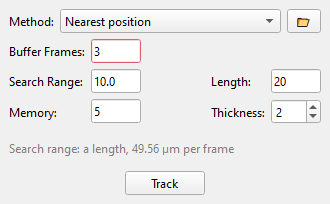
Linking joins the detections of one cell in successive frames into a track.
Settings
- Method: see the table below.
- Search range: how far a cell may move from one frame to the next, in pixels (a length; with a calibration also shown in µm per frame). Too small breaks tracks, too large joins neighbours.
- Memory: for how many frames a cell may go undetected and still keep its track.
- Buffer frames: frames at the start that only train the background and are not tracked.
- Trace length and thickness: how the tracks are drawn.
| Method | What it does |
|---|---|
| Nearest position | Each cell is linked to the nearest detection in the next frame, for all cells at once (Crocker and Grier) |
| Nearest predicted position | The same, searching around where the cell's last step says it will be. Better in fast flow |
| Flow assignment | Written for flow in one direction along the picture's horizontal axis; links against the flow are not made |
| Flow assignment with gap closing | The same, plus a second pass that joins track pieces across longer gaps |
The folder button loads a linking method from a Python file.
Tracking a recorded video
Set the frame range in the Chopper (the two marks on the slider show it), then press Track. The status bar shows the progress; Esc stops and keeps the frames tracked so far.
Cell IDs can differ between two runs of the same video; the tracks are the same.