Live Tracking
Tools > Live Tracking. Needs a Vision Research Phantom camera on Windows; see Install.
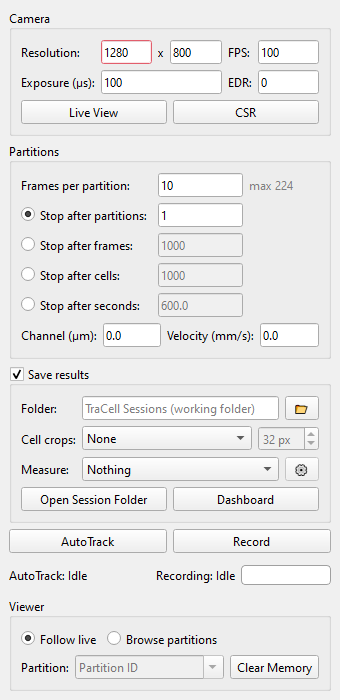
How a session runs
The camera's memory is divided into partitions. The camera records one partition and goes on into the next while TraCell reads the finished one into the computer's memory and tracks it. Nothing waits for a disk.
Each partition is tracked on its own, because the camera leaves a gap between two partitions. A cell that is in the picture when a partition starts or ends is incomplete: it is kept and marked, and left out of counts.
Before you start
- Set resolution, frame rate and exposure. Live View shows the camera's picture without recording. CSR takes the black reference; cover the lens when asked.
- Set detection and tracking on the live picture as for a video (Mask, Contours, Tracker).
- Choose Frames per partition. The window shows the most this computer's free memory allows. Type the channel length in the picture and the expected cell velocity, and it says how many frames a cell needs to cross and what share of the cells a partition tracks completely. A partition ten times as long as the crossing time tracks about 82% of the cells completely.
Stop rules
The session stops by itself after a number of partitions, frames, completely tracked cells or seconds, or when you press Stop. The rule is checked when a partition is done.
Saving results
- A session folder with a table per partition, a table of all cells and the settings used is always written.
- Cell crops: a small picture of every tracked cell, with background, without, or both. Crops make the session slower.
- Measure: values computed from the crops become columns of the tables: brightness, contrast and granularity computed by TraCell, or the outputs of your own model on a model server (Open Inference Protocol). Measuring runs behind the session and never holds the camera up.
- Record also saves each partition's raw frames as AVI.
During a session
Changes to adjustment, mask, contours or tracker wait until the session stops, so every partition is processed the same way. The viewer follows the newest partition, or browses the ones in memory. The Live Dashboard shows the cells as they come in.