Contours
Tools > Contours > Settings, and Tools > Contours > Show Contours to draw them on the video.
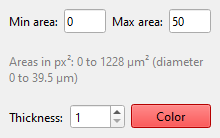
Every white region of the mask with an area between Minimum area and Maximum area is one detection. Raise the minimum to leave out debris, lower the maximum to leave out clumps.
Both limits are areas in pixels of the processed picture. With a calibration the window also shows them in µm² and as the diameter of a circle of that area.
For every detection TraCell measures the centre, the area, the perimeter, the equivalent diameter and the circularity (4πA/p², 1 for a circle). There are no shape limits at this step: filter odd detections afterwards in Trajectories.
Thickness and Colour only change how contours are drawn.