User guide
One page per window. New to TraCell? The first run walks through a whole analysis in five minutes; Help > Open Sample loads a short recording with settings that track it.
| Window | Where | What it is for |
|---|---|---|
| Main window | The video, playback, region of interest, selecting a cell | |
| Adjustment | Tools > Adjustment | Brightness, contrast, gamma, tone curve |
| Mask | Tools > Mask | Separating cells from the channel |
| Contours | Tools > Contours | Which regions count as cells |
| Tracker | Tools > Tracker | Linking detections into tracks |
| Trajectories | Tools > Trajectories | Table, filters, plots, per-cell values |
| Calibration | Edit > Calibration | Micrometres and seconds |
| Export | File > Export | Tables, settings, cell crops, video |
| Live Tracking | Tools > Live Tracking | Tracking while a Phantom camera records |
| Live Dashboard | Tools > Live Dashboard | The cells of a live session as they come in |
| Bookmarks and notes | Tools menu | Marking frames, describing the session |
| Preferences and presets | Edit > Preferences, File menu | Theme, folders, saving settings |
| Command line | a terminal | The same analysis without the window |
When TraCell starts
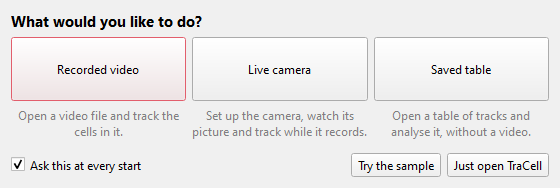
TraCell asks what the session is for: a recorded video, the live camera or a saved table of tracks. All three lead to the same window; the choice only opens the right dialog. Try the sample loads the example recording. Untick "Ask this at every start" to skip the question; Edit > Preferences brings it back.